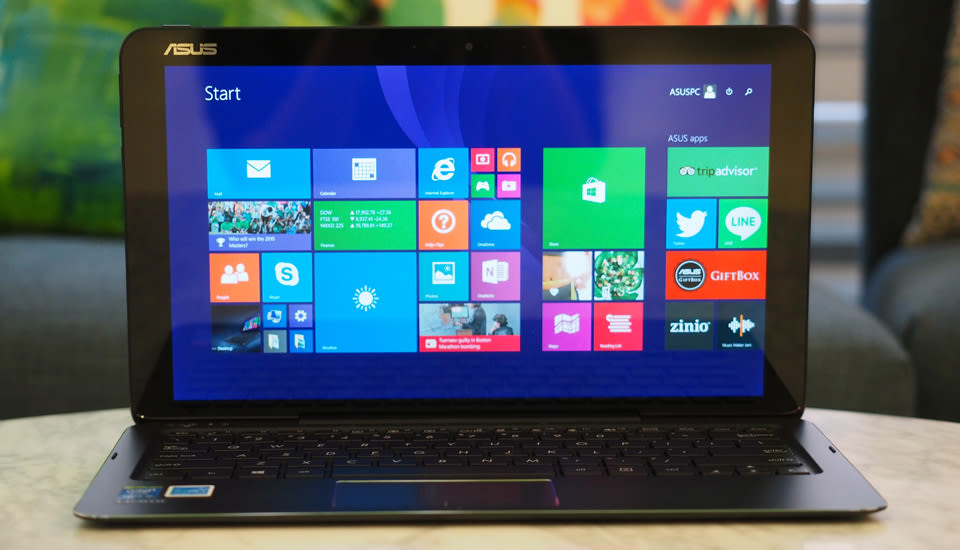
When ASUS formally unveiled the Transformer Book Chi T300, it did so in the cheekiest way possible: with a cleverly worded swipe at Apple. "Our Chi is thinner than Air," the company proclaimed -- a clear shot at the MacBook Air. ("Chi" means "air" in Mandarin Chinese, by the way, in case the dig wasn't obvious enough.) Indeed, ASUS' newest laptop/tablet hybrid measures a scant 0.3 inch for the tablet (or 0.65 inch when docked), making it slightly thinner than the Air, which comes in at 0.68 inch at its thickest point. The Chi is also more affordable than the Air (not to mention most other thin-and-light laptops), with a starting price of $699. On paper, it's a relatively affordable way to get your hands on a super-skinny machine. In practice, though, you're probably better off spending a little more on something else. Here's why.
Gallery: ASUS Transformer Book Chi T300 review | 26 Photos


Hardware

Problem number one: While the 12.5-inch Chi is indeed super thin, it isn't what I'd call super light. At 1.59 pounds for the tablet alone and 3.15 pounds with the keyboard dock attached, it's relatively heavy. Certainly, it feels noticeably heavier than the 2.62-pound Lenovo Yoga 3 Pro, which can also be used as a tablet when needed. The Dell XPS 13 is lighter too, at 2.6 pounds, though with its fixed display, you admittedly can't use it as anything other than a touchscreen notebook. Even the 13-inch MacBook Air, the machine ASUS seems to be gunning after, comes in at a lighter 2.96 pounds. All of which is to say: For a device that's being marketed for its portability, the Chi doesn't feel exceptionally light.
That alone isn't necessarily a dealbreaker, but in the case of the Chi, a big portion of those three-plus pounds feels like dead weight. As heavy as the Bluetooth keyboard dock is, it doesn't add much beyond the actual keys. There's no extra battery inside. And there are virtually no extra ports, save for a micro-USB opening on the dock's left edge. By comparison, the Yoga 3 Pro and Dell XPS 13 both offer two full-sized USB 3.0 ports and either a Mini DisplayPort or micro-HDMI connection. Even the 1.76-pound Surface Pro 3 manages to squeeze in a Mini DisplayPort and USB socket. Admittedly, Microsoft's keyboard cover offers nothing in the way of extra connections, but then again, it also barely adds to the tablet's weight or thickness. In any case, this is where I return to the weight issue: What's the point of having a machine this heavy if you're going to get fewer ports than you would on a lighter system?

This means that the dock is left with just one job: to offer a comfortable typing experience. Even then, I'm not a huge fan. It's mostly the touchpad; it's the worst I've seen on any recent Windows laptop. The tracking was so unreliable, so imprecise, that after a while I avoided using the trackpad at all; if it was possible to hit a button on the desktop with my finger, I did so using the touchscreen. On the bright side, I appreciate the generous 1.5mm of key travel; between that and the well-spaced layout, I was generally able to type without making mistakes.
All told, this means the Chi is, in some ways, at its best in tablet mode. Even then, its nearly 13-inch screen makes it a bit unwieldy. (On the bright side, this is the world's thinnest 13-inch tablet, for what that's worth, and at 1.59 pounds it's markedly lighter than the Surface Pro 3.) Even so, I find the SP3 easier to use as a slate, in part because of the less-stretched-out 3:2 aspect ratio. I don't necessarily think the Surface has a more comfortable keyboard or trackpad, but it does work better than the Chi as a tablet -- kind of an important thing on a hybrid device like this. And again, I can forgive the Surface's relatively middling keyboard cover somewhat because it at least doesn't weigh down the rest of the machine.

In the plus column, the Chi's all-aluminum casing feels solid, even if the full package is on the heavy side. I also like how the 12.5-inch screen has the tiniest of bumpers lining the edges; for all intents and purposes, it looks like edge-to-edge glass. Speaking of the sort, though the Chi is available at the lower end with a 1,920 x 1,080 display, I tested it with a higher-end, 2,560 x 1,440 panel, with a pixel density of 235 ppi. Particularly at $899 -- what my particular configuration costs in the real world -- this is a great screen: vibrant and crisp, with wide viewing angles, thanks to the IPS panel. In addition, there's an active digitizer inside, allowing it to recognize 256 levels of pressure sensitivity, whether through pen or finger input. That puts it on par with the Surface Pro 3, with one difference: The stylus pen here is sold separately, for $40. Unfortunately, I didn't get to test it out as part of my review, so I can't vouch for pen performance, except to say that having a pressure-sensitive screen at this price is already a plus.
Compared to the screen (perhaps the Chi's best feature), the sound quality feels a little like an afterthought, although it's still acceptable. The audio is a bit tinny, as is the case on many ultraportable laptops, but the volume is loud enough and I ultimately got used to the sound quality, even if it is a bit lacking in the bass department.
0 comments :
Post a Comment